C# DLL 포함하여 EXE 빌드하기
Newtonsoft.Json.dll 을 예시로 설명드리겠습니다. (다른 DLL도 동일한 방식으로 하면 됩니다.)
1. 프로젝트 -> NuGet 패키지 관리 -> Newtonsoft.Json 설치를 진행합니다.

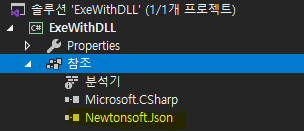
2. 설치를 완료하면 참조그룹 하위에 Newtonsoft.Json이 추가됩니다.
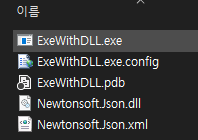
3. 프로젝트를 필드하면 빌드 경로에 Newtonsoft.Json.dll 파일이 exe파일과 함께 생성됩니다.
4. 프로젝트 우클릭 -> 추가 -> 기존 항목 메뉴를 실행하여 빌드 경로에 있는 Newtonsoft.Json.dll 파일을 추가해 줍니다.

5. Newtonsoft.Json.dll 속성 -> 빌드 작업 -> 포함 리소스로 변경해 줍니다.
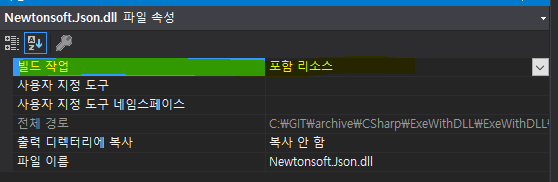
6. Newtonsoft.Json 참조 속성에서 로컬 복사를 False 로 설정합니다.

7. Program.cs (애플리케이션의 주 진입점)에 dll 파일들을 어셈블리하게 해주는 코드(ResolveAssembly)를 추가합니다.
static void Main() {
// 리소스 dll 취득
AppDomain.CurrentDomain.AssemblyResolve += new ResolveEventHandler(ResolveAssembly);
Application.EnableVisualStyles();
Application.SetCompatibleTextRenderingDefault(false);
Application.Run(new Form1());
}
// .NET 4.0 이상
static Assembly ResolveAssembly(object sender, ResolveEventArgs args) {
Assembly thisAssembly = Assembly.GetExecutingAssembly();
var name = args.Name.Substring(0, args.Name.IndexOf(',')) + ".dll";
var resources = thisAssembly.GetManifestResourceNames().Where(s => s.EndsWith(name));
if (resources.Count() > 0) {
string resourceName = resources.First();
using (Stream stream = thisAssembly.GetManifestResourceStream(resourceName)) {
if (stream != null) {
byte[] assembly = new byte[stream.Length];
stream.Read(assembly, 0, assembly.Length);
Console.WriteLine("Dll file load : " + resourceName);
return Assembly.Load(assembly);
}
}
}
return null;
}
// LINQ가 지원되지 않는 .NET 버전
static Assembly ResolveAssembly(object sender, ResolveEventArgs args) {
Assembly thisAssembly = Assembly.GetExecutingAssembly();
string resourceName = null;
string fileName = args.Name.Substring(0, args.Name.IndexOf(',')) + ".dll";
foreach (string name in thisAssembly.GetManifestResourceNames()) {
if (name.EndsWith(fileName)) {
resourceName = name;
}
}
if (resourceName != null) {
using (Stream stream = thisAssembly.GetManifestResourceStream(resourceName)) {
if (stream != null) {
byte[] assembly = new byte[stream.Length];
stream.Read(assembly, 0, assembly.Length);
Console.WriteLine("Dll file load : " + resourceName);
return Assembly.Load(assembly);
}
}
}
return null;
}
이제 DLL이 빌드경로에 복사되지 않고 하나의 EXE로 빌드가 완료됩니다.
Sample :
public partial class Form1 : Form
{
public Form1()
{
InitializeComponent();
label1.Text = $"{(JsonTest() ? "성공" : "실패")}";
}
private static bool JsonTest()
{
var testModel = new TestModel
{
Test1 = "test1",
Test2 = "test2"
};
return "{\"Test1\":\"test1\",\"Test2\":\"test2\"}".Equals(JsonConvert.SerializeObject(testModel));
}
}
public class TestModel
{
public string Test1 { get; set; }
public string Test2 { get; set; }
}
'C#' 카테고리의 다른 글
| c# 정규식 기호표 (0) | 2026.03.12 |
|---|---|
| [C#] DLL 포함시켜 단일 EXE로 만들기 #2 (0) | 2026.03.12 |
| How to use a DarkUI (dark user interface) in Winforms C# (5) | 2025.04.30 |
| How to create barcode images from a string with different formats with C# using the barcodelib library in WinForms (1) | 2025.04.30 |
| How to run any executable inside the System32 directory of Windows with C# in WinForms (1) | 2025.04.30 |